Sending
Sending domain
Send from your own domain, with the DNS records that prove it's you.
Percy sends your newsletter from your own domain, such as hello@yourname.com. Inboxes trust mail that's signed by the domain it claims to come from, so this one step does more for deliverability than anything else.
#Don't have a domain yet?
You need one to send. A domain is a name like yourname.com, and you can buy one from a registrar such as Cloudflare, Namecheap or Porkbun, usually for about $10 to $15 a year. The registrar also gives you the DNS page you'll use below. Your forms and website work while you sort this out; only sending waits.
#Set it up
- Go to Settings → Sender & domain.
- Enter your domain, your sender name (what people see in their inbox), a sender address at that domain, and a postal address. Anti-spam laws require the postal address in every email footer; a P.O. box or business address is fine.
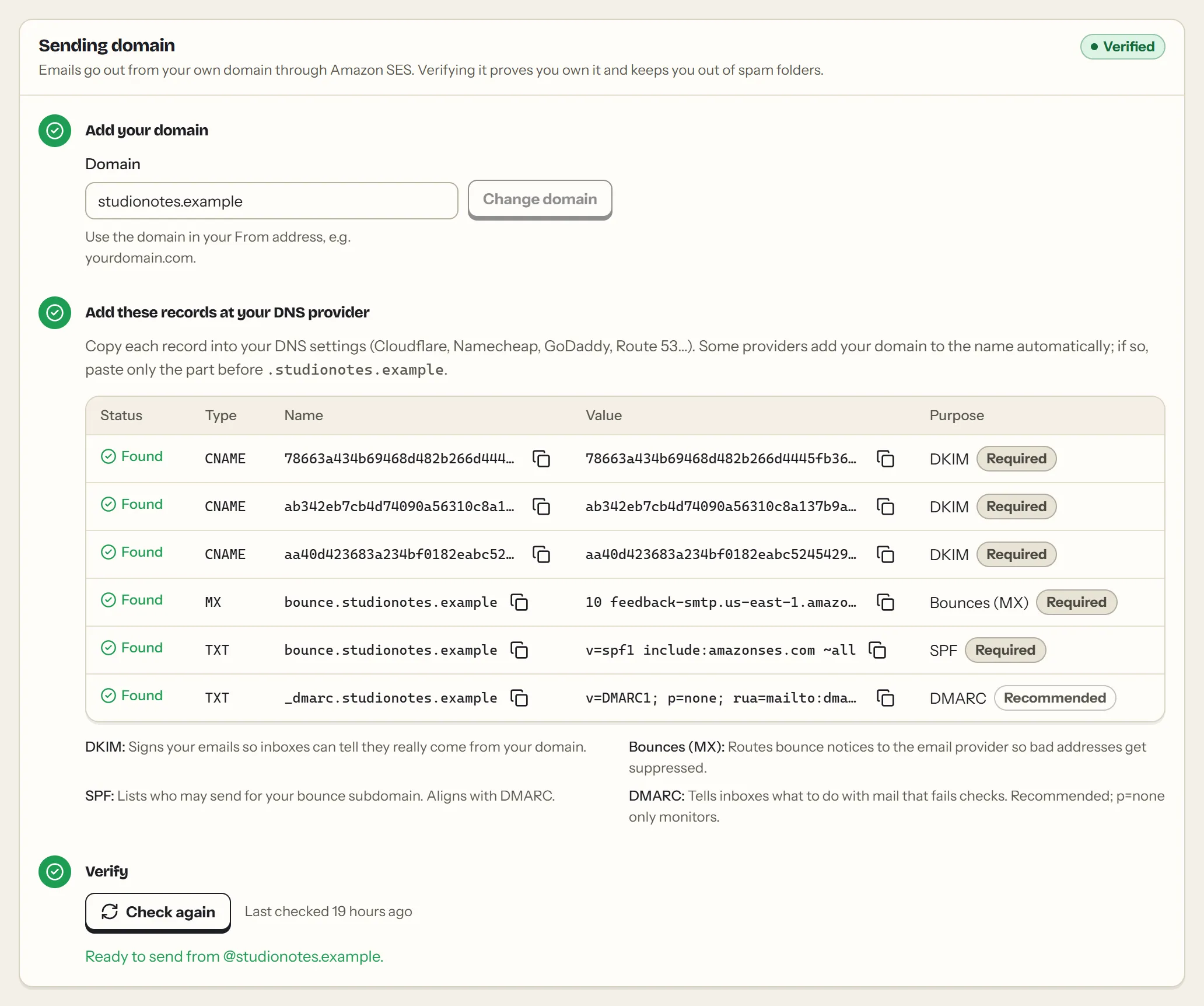
- Percy shows the DNS records to add. Copy each one into your domain provider's DNS settings: Cloudflare, Namecheap, GoDaddy, Google Domains and others all have a DNS page.
- Choose Check DNS now. Percy also re-checks on its own every 10 minutes.
#The records
| Record | What it does |
|---|---|
| DKIM (3 CNAME records) | Signs your emails, so inboxes can tell they really come from your domain. |
| Bounces (MX) | Sends bounce notices back to Percy, so bad addresses are removed automatically. |
| SPF (TXT) | Lists who may send for your bounce subdomain. |
| DMARC (TXT) | Tells inboxes what to do with mail that fails the checks. Recommended. Percy suggests v=DMARC1; p=none, which only monitors. If your domain already has a DMARC record, keep it: Percy counts it and shows what it found. |
Each record's name is shown the way most DNS pages want it, relative to your domain: abc._domainkey, or abc._domainkey.news if you send from news.yourname.com, and @ for the domain itself. Hover over a name to see the full host. Each record shows Found, Waiting or Not found. DNS changes can take a few minutes, occasionally a few hours.
#If a record says Not found
Most of the time it's one of these:
- The name was doubled. Most DNS pages add your domain to the name automatically, which is why Percy shows the short name. If you typed the full host (
abc._domainkey.yourname.com) there, the record ends up atabc._domainkey.yourname.com.yourname.com; enter just the short name. - A typo or extra space in the value. Copy it with the copy button instead of selecting the text.
- Cloudflare's proxy is on for a CNAME record. Set it to DNS only (grey cloud).
- On Namecheap, there's no place for the MX record. MX records only appear in Advanced DNS when Mail Settings is set to Custom MX.
- It's still spreading. Changes usually show within minutes, sometimes a few hours. Percy keeps checking on its own.
#Good to know
- Your sender address must be at your verified domain. Percy checks this again on every send.
- Each domain can belong to one Percy account. If someone else started setting up your domain and never finished, their claim expires after 72 hours.
- Changing your domain starts verification over with new records.
This page as Markdown: https://percymail.com/docs/sending-domain.md. All the docs: https://percymail.com/llms.txt.